MicroCity
| < 3.3 Running Scripts | Table of Contents | 4.1 SI Overview > |
3.4 Navigating Scenes
3D/2D objects loaded or generated by scripts can be displayed on the scene canvas, and users can view them from different angles through navigation gestures.
Scene Canvas
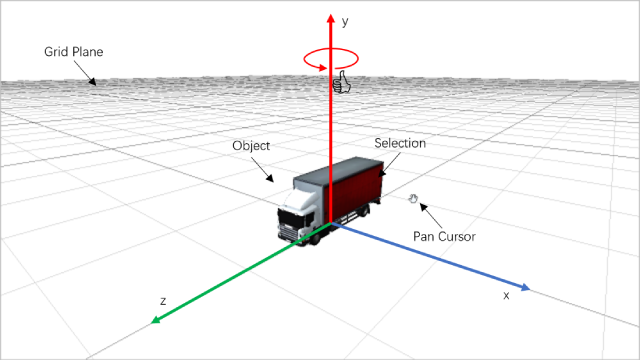
You can create a new script copying from the ‘Loading GLTF’ sample and run it. The scene canvas can display a 3D virtual world. The relationship between the xyz coordinate axes satisfies the right-hand rule (as shown in the figure), and the initial position of the camera is (20, 10, 20). When the scene camera is set to z-axis orthogonal projection (camtype=’ortho’), the 3D world displayed in the scene canvas will become ‘2D’, and the initial position of the camera is (0, 0, 1). Object can be selected, and the selection is then processed in the script. Other operations lick translation, rotation and scaling can also be done through scripts. The rotation obey the right-hand rule. For details, please refer to 4.3 Scene and Object.
Navigation Gestures
Similar to 2.1 Rolling a Cube, here we present another example which is more easier to understand and practice, see below:

External Tools
For easier editing and previewing of objects, here are some useful tools:
- A GeoJSON file editor: https://geojson.io
- A GIS file editor and converter: https://mapshaper.org
- A 3D file viewer: https://3dviewer.net
- A 3D file editor and converter: https://www.gltfeditor.com
| < 3.3 Running Scripts | Table of Contents | 4.1 SI Overview > |