MicroCity
| < 1.1 What MicroCity Web can Do | Table of Contents | 2.2 Searching for Countries > |
2.1 Rolling A Cube
This tutorial is to guide you in using the MicroCity Web User Interfaces.
Running the Script
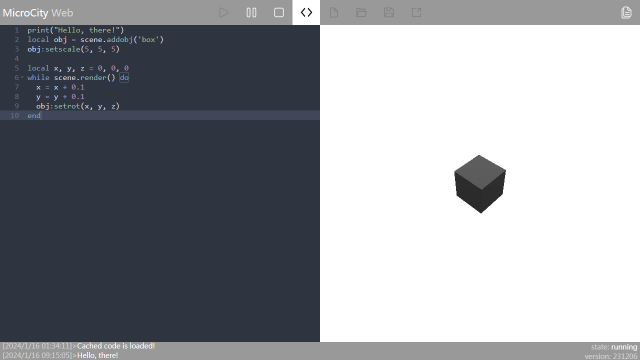
When you open MicroCity Web for the first time, a sample script will be automatically loaded into the script editor on the left. Click the Run button, a “hello, there!” message will appear in the message bar below, and a rolling cube will appear in the scene canvas on the right. You can also use the buttons to pause
 or stop
 the cube, or click the code
 button to hide the script editor and expand the scene canvas. For more information on running scripts please refer to 3.3 Running Scripts.
Editing the Script
The MicroCity script uses the Lua language. Please read the comments carefully to understand the behavior of the sample script and refer to 4.3 Scene and Object for details on control scenarios and object functions. If you want to see something different, add the following code before obj:setrot(x, y, z):
z = z + 0.1
This code will change the way the cube rotates. You can save the new code locally or publish
 it online, and MicroCity will generate a URL similar to https://microcity.gitee.io/#xxxxxx. Others can access the MicroCity application you created or modify your code through this URL. For more information on editing scripts please refer to 3.2 Editing Scripts.
Navigating the Scene

If you want to observe the scene from different angles and orientations, you can use the mouse to navigate the scene canvas. Press and hold the left mouse button in a blank space of the scene canvas and drag. The scene camera will rotate in the opposite direction of mouse movement. If you hold down the right mouse button and drag, and the scene camera will translate in the opposite direction of mouse movement. If the left mouse button selects an object and drags it, the scene camera will center on the object and rotate in the opposite direction of mouse movement. In addition, sliding the mouse wheel can move the scene camera forward and backward. For more information please on navigating scenes please refer to 3.4 Navigating Scenes
| < 1.1 What MicroCity Web can Do | Table of Contents | 2.2 Searching for Countries > |