MicroCity
| < 3.1 UI Overview | Table of Contents | 3.3 Running Scripts > |
3.2 Editing Scripts
MicroCity Web applications are written by Lua Script. In addition to being familiar with Lua’s syntax, users also need to be proficient in using a script editor.
Script Editor
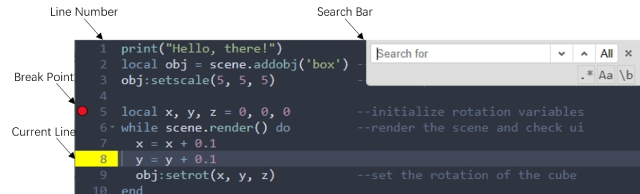
The Script Editor integrated is based on Ace, which is easy to use and has many features. The following figure shows the graphics and symbols that often appear in the editor window. The “Break Point” and “Current Line” are used when debugging the script.
Keyboard Shortcuts
Most of the shortcut keys follow the settings in Ace, and some are customized by MicroCity Web. The most commonly used ones are listed here:
Ctrl + BNew fileCtrl + SSave fileCtrl + OOpen fileCtrl + ZUndoCtrl + YRedoCtrl + FFindCtrl + HReplaceCtrl + /Toggle commentTabIndentShift + TabOutdentF1Help at current cursor
Code Generation
The script can be automatically generated by AI. Just type three “-“ at the beginning of a line, then enter the prompts and press Enter:

By default, a free service is used to generate code which has some restrictions. Users can set up a custom OpenAI API compatible service as the following console command:
os.execute("RemoteCall('SetChatAPI', 'https://api.openai.com/v1', 'sk-xxxxxxxxxxxxxxx', 'gpt-4')")
| < 3.1 UI Overview | Table of Contents | 3.3 Running Scripts > |