MicroCity
| < 4.4 Discrete Event Simulation | Table of Contents |
4.5 Mixed Integer Programming
Linear programming and mixed integer programming are important tools in operations research, and functions and some examples for solving these models are provided here. Note that a call mip:func(args) is syntactic sugar for math.func(mip, args).
Functions
For the convenience of explanation later, first look at a typical Linear Programming (LP) model:
       min     d1*x1 +  d2*x2 + ... +  dn*xn
subject to    a11*x1 + a12*x2 + ... + a1n*xn >= b1
              a21*x1 + a22*x2 + ... + a2n*xn >= b2
                   ........................
              am1*x1 + am2*x2 + ... + amn*xn >= bn
This model has n columns of variables and m + 1 rows of lower bound constraints (the objective function is also a special inequality). There are also m dual variables. Mixed Integer Programming (MIP) problem is an LP problem in which some variables are additionally required to be integer. In order to concisely construct mip models and solve them, we designed the following six functions. Note that a call mip:func(args) is syntactic sugar for math.func(mip, args).
Create a new mip model or read a model in CPLEX LP format from a file fin and return it. By default, every column variable is greater than or equal to 0.
mip:addrow (coltab|colname, bndtype [, b [, rowname]])
Add a row to the model mip.
- The table coltab contains the coefficients that the column variables need (can be sparse), such as ‘{1, 3, [5]=7}’ or ‘{x1=1, x2=3, x5=7}’. A new numerically indexed column variable is automatically named “cn”, where n is the current maximum number of columns plus 1.
- The colname is a single column varibale name with the coefficient of 1.
- The bndtype if one of “min”, “max”, “<=”, “<”, “>=”, “>”, “=”, “==”, “unb”, “bin”, “int”, which represent different bound type.
- The b (right value of inequality) and rowname is only applicable if the bndtype is one of “<=”, “<”, “>=”, “>”, “=”, “==”.
- By default the rowname (row or dual variable name) is “rm”, where m is the current maximum number of rows plus 1.
Delete a row frome the mip model.
mip:addcol (rowtab, bndtype, d [, colname])
Add a column to the model mip.
- The table rowtab contains the coefficients that the row variables need (can be sparse), such as ‘{2, 4, [6]=8}’ or ‘{u1=2, u2=4, u6=8}’. A new numerically indexed row variable is automatically named “rm”, where m is the current maximum number of rows plus 1.
- The bndtype is one of “~”, “<=”, “<”, “>=”, “>”, “=”, “==”, which represent different dual problem bound type. Note that when the inequalities of the dual problem are added as columns to the prime problem, the signs of the coefficients need to be rejudged. For example, if the inequality with the dual constraint “>” sign is added to the column of the minimization prime, the sign of the coefficient needs to be reversed. A column using bndtype “~” can be directly added to the prime model.
- The d is right value of dual inequality.
- By default the colname is “cn”, where n is the current maximum number of columns plus 1.
Delete a column frome the mip model.
Solve the mip model (save the model in CPLEX LP format to a file fout).
- For a Linear Programming, return one of “optimal”, “feasible”, “infeasible”, “nofeasible”, “unbounded”, “undefined”. Write the objective, column (prime) variable and row (dual) variable values to the ‘obj’, colname and rowname properties of the mip model respectively.
- For a Mixed Integer Programming, return one of “optimal”, “feasible”, “nofeasible”, “undefined”. Write the objective, column variable values to the ‘obj’, colname properties of the mip model respectively.
Example Models
Here two simple models are demonstrated, first is a Mixed Integer Programming model with two variables and two constraints:
       max     143x1 + 60x2
subject to     110x1 + 30x2 <= 4000
                  x1 +   x2 <= 75
                  x1        ∈ {0, 1, 2, ...}
                         x2 ∈ {0, 1}
Translate the mathematical model into code:
local mip = math.newmip()                   --create a integer programming

mip:addrow({x1 = 143, x2 = 60}, 'max')      --set the objective function
mip:addrow({x1 = 110, x2 = 30}, '<=', 4000) --add the first constraint
mip:addrow({x1 = 1,   x2 = 1},  '<=', 75)   --add the second constraint
mip:addrow('x1', 'int')                     --set x1 a integer bound
mip:addrow('x2', 'bin')                     --set x2 a binary bound
mip:solve()                                 --solve the model

print(mip.obj, ' ', mip.x1, ' ', mip.x2)    --print objective and variables values
Let’s show a slightly more complex example, which is a linear program with abbreviations for the objective function and constraints:
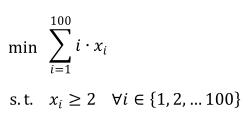
There are 100 variables and 100 constraints in this model, which cannot be added one by one manually. They need to be processed through a loop:
local lp = math.newmip()         --create a linear programming
local c = {}                     --create a coefficient array
for i = 1, 100 do                --traverse the array
     c[i] = i                    --set the coefficient
end
lp:addrow(c, "min")              --set the objective function

for i = 1, 100 do                --traverse the 100 constraints
     local w = {}                --create an array of constraint coefficients
     for j = 1, 100 do           --traverse the 100 constraint coefficients
         if i==j then            --if the row number is equal to the column number
             w[j] = 1            --set the coefficient to 1
         else
             w[j] = 0            --otherwise set the coefficient to 0
         end
     end
     lp:addrow(w, ">=", 2)       --add constraints to the model
end
lp:solve()                       --solve the model

print(lp['obj'])                 --print the objective value
| < 4.4 Discrete Event Simulation | Table of Contents |